 StitchPilot.ai
Ink/Stitch alternative
An Online Ink/Stitch Alternative — No Inkscape Required
Ink/Stitch is free but lives inside Inkscape with a command-line vibe. StitchPilot.ai runs in your browser, uses AI to handle stitch decisions, and opens the same file formats (PES, DST, JEF, VP3, EXP, HUS, XXX) without an install.
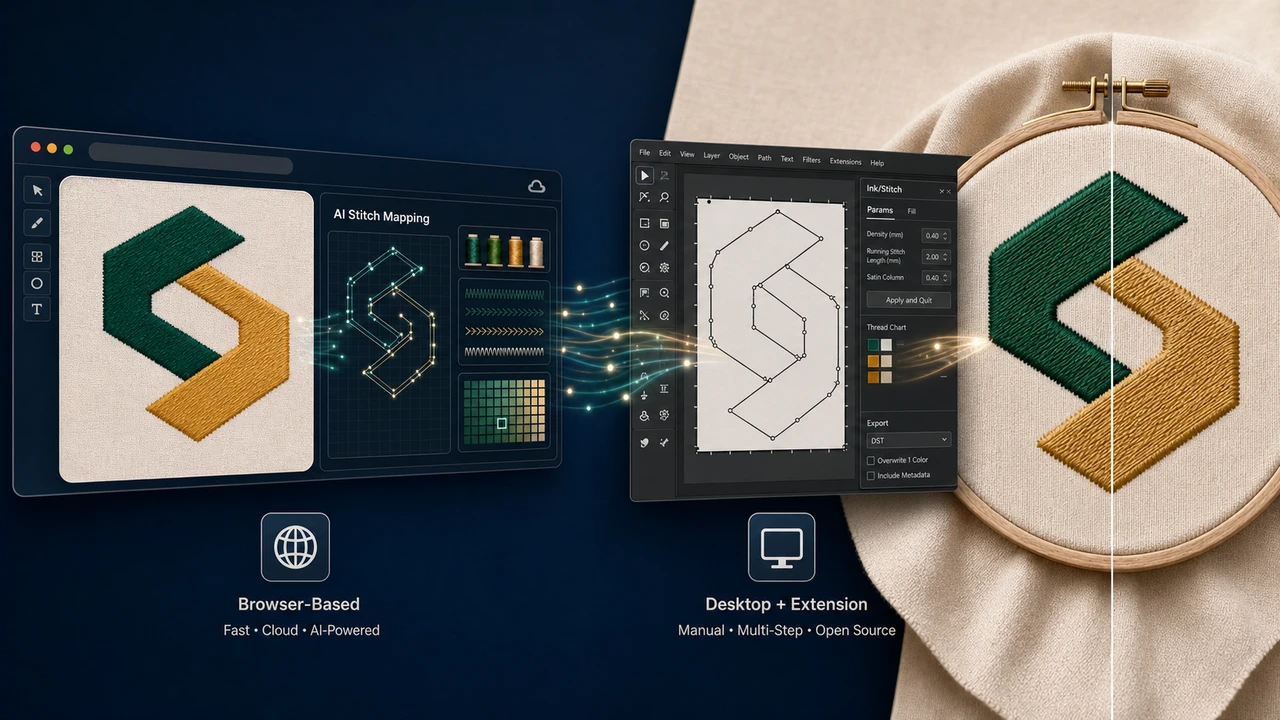
Side-by-side comparison
| Feature | StitchPilot.ai | Ink/Stitch |
|---|---|---|
| Price | Free (typical use) | Free, open source |
| Install required | No — browser only | Inkscape + Ink/Stitch extension |
| Platform | Web — any modern browser | Windows, macOS, Linux (via Inkscape) |
| Approach | AI-assisted digitizing | Manual: paths in Inkscape, params per object |
| Learning curve | Minutes | Hours to weeks (depending on Inkscape comfort) |
| Best for | Quick conversions, AI digitizing, file preview | Inkscape users, manual stitch path control, hackers |
| File preview | Built in — PES, DST, JEF, VP3, EXP, HUS, XXX | Via Inkscape canvas |
| Conversion between formats | One click in browser | Re-export from Inkscape |
| Open source | No — hosted commercial product | Yes, GPL |
| Support | Email + docs | Community forum, GitHub issues |
When to choose StitchPilot.ai
You want a tool, not a project
StitchPilot.ai works well when the conversion is the goal — you have artwork, you want a PES or DST for your machine, and you do not want to install Inkscape, learn its vector tools, and configure Ink/Stitch parameters per object. Upload, preview, export.
- You do not already use Inkscape regularly
- You want AI to handle stitch types and density
- You also need to preview client-sent PES/DST/JEF files
- You work on multiple devices (laptop, iPad, work PC)
When Ink/Stitch still wins
You want full manual control and the source code
Ink/Stitch is the right choice for users who live in Inkscape, want to control every stitch path manually, and value open-source guarantees. It pairs well with custom scripts and version-controlled SVG workflows.
- You are already comfortable in Inkscape
- You want stitch-path-level manual control
- You require an open-source toolchain
- You enjoy parameter tuning per object
StitchPilot.ai vs Ink/Stitch — common questions
Why look for an Ink/Stitch alternative?
Ink/Stitch is a free Inkscape extension and works well for users comfortable with Inkscape and command-line workflows. If you want a no-install browser tool with AI digitizing, StitchPilot.ai covers the same conversion needs with a much lower learning curve.
Is StitchPilot.ai open source like Ink/Stitch?
StitchPilot.ai is a hosted commercial product with a free tier — not open source. The trade-off: no install or extension setup, AI-assisted digitizing, and ongoing maintenance handled for you.
Can I open files exported by Ink/Stitch?
Yes. Ink/Stitch exports to standard formats (PES, DST, JEF, EXP, HUS, VP3, XXX). StitchPilot.ai opens all of them in-browser for preview, re-export, or further conversion.
Does StitchPilot.ai have stitch path editing?
StitchPilot.ai focuses on AI-driven digitizing and conversion. For pixel-level path editing of every stitch, Ink/Stitch (with Inkscape) and dedicated desktop suites like Hatch give you more manual control.
How does AI digitizing compare to Ink/Stitch params?
Ink/Stitch lets you tune stitch parameters per object inside Inkscape — granular but manual. StitchPilot.ai uses AI to choose stitch types, density, and color separation automatically, with preview and re-run if you do not like the result.
Try the AI workflow
Convert your first image to embroidery in 30 seconds
No install. Upload a PNG, JPG, SVG, or WebP and see how AI-assisted digitizing compares to the Ink/Stitch + Inkscape workflow.
Start free →